




Skip to content
Client channel

The client asks the easiest way. Nothing gets lost

On Telegram, they write or send audio in the project group, the ticket lands on the board and they're notified at every stage, no sign-up. It also works by email.

1In the client's group (example)

  • Request without signing up

    Anyone in the project group requests and comments there. No account and no password on benflow.

  • Audio becomes text

    The client sends audio and the team reads the request already written out. Transcription runs on benflow's server.

  • Replies become comments

    The client replies to the ticket message and the comment lands in the panel. The team's reply goes back to the group.

  • Notice at every stage

    The bot notifies the group when the ticket changes stage, from opening to delivery.

  • Prefer email? Each project has its own

    An email sent to the project's address becomes a card, with attachments. The client's reply comes in as a comment on the same ticket.

    • Attachments on the card
    • Reply becomes a comment
Client portal

Your client follows along without having to ask

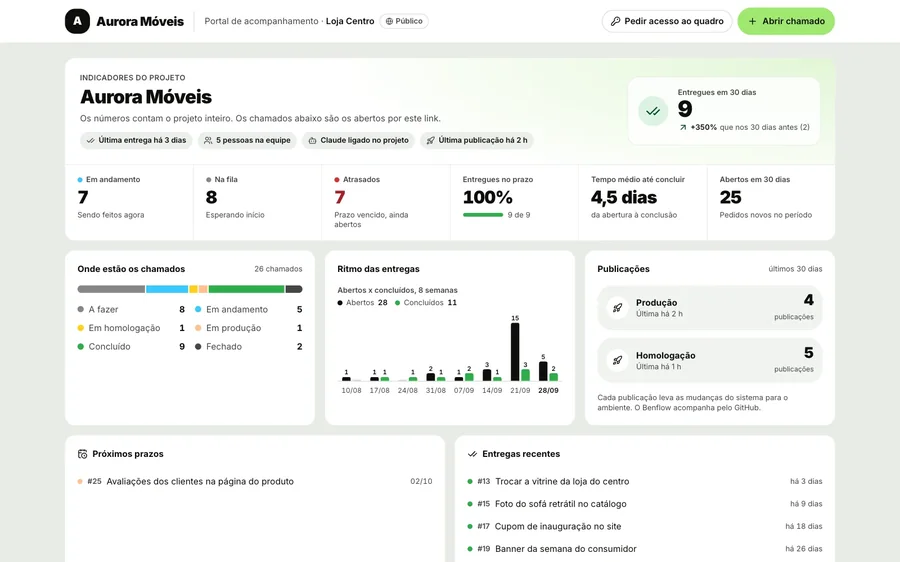
A public or password-protected link shows the project numbers, due dates and deliveries. There they can also open and follow requests.

Example project
Client portal with the project's indicators: deliveries in 30 days, tickets by stage, delivery pace and releases
  • The project numbers

    Deliveries in 30 days, what's in each stage, the weekly pace and the releases, updated automatically.

  • Public or password-protected

    You decide who opens the link and whether it shows only the client's requests or all of the project's.

  • They can request there too

    If you allow it, the client opens a ticket through the portal and follows the conversation through the request link.

  • Request board access

    Whoever wants to see more requests access through the portal, and the admin approves in Members.

  • Internal notes stay out

    What the team writes just for the team never shows up in the portal.

Everything about the request

Ticket opened, you can start right away

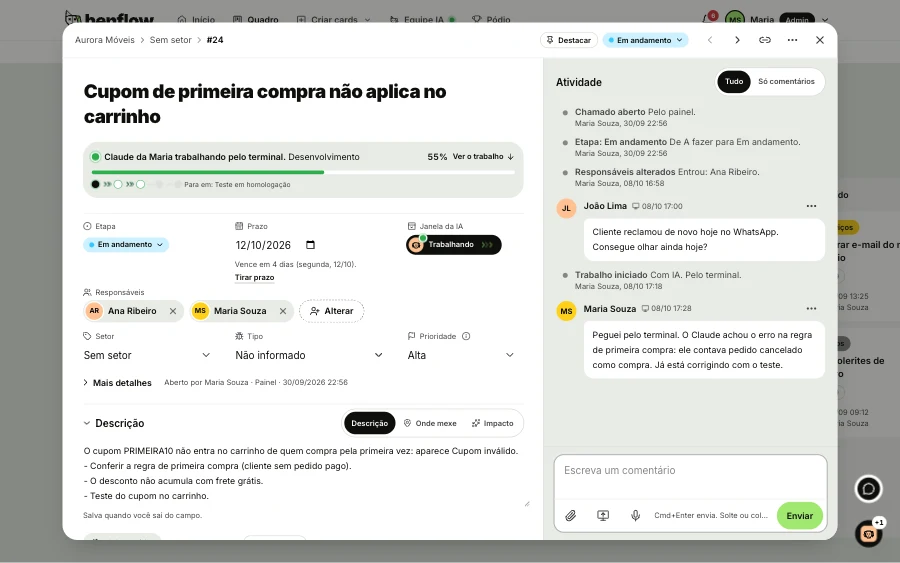
Who asked, the conversation, the files and what the AI has already done live in the ticket record. The dev doesn't ask again and the client doesn't repeat the request.

Woman developer smiling in front of a whiteboard with a screen sketch

benflow, Aurora Móveis bot

Ticket #24 opened

Open in panel
Direct ticket linkbenflow.net/o/aurora-moveis/c/24
Team chat

The team's conversation becomes a card

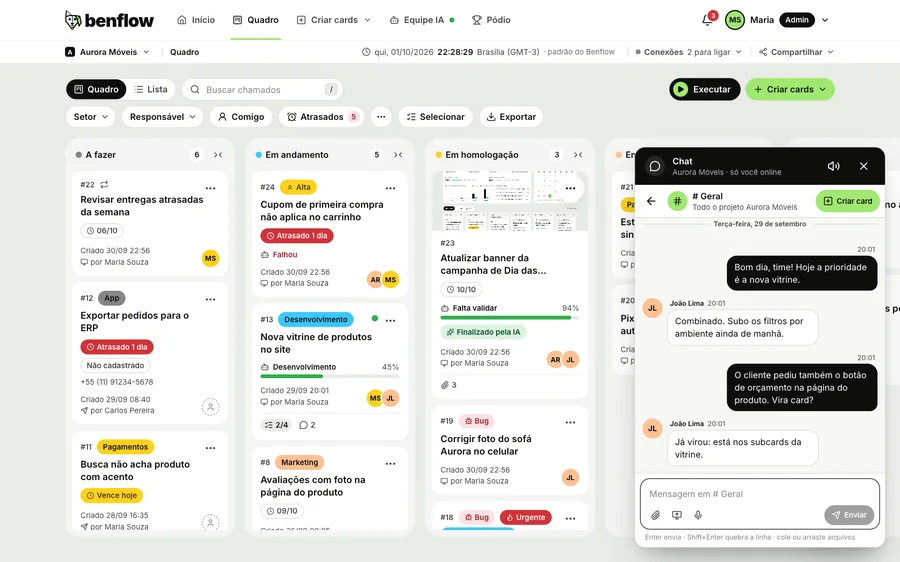
The team talks inside the project, no side group. What was agreed becomes a card, and the notifications bell tells you what needs your attention.

  • Message becomes a card

    Agreed on something in the chat? One click on Create card sends the message and its files to the board.

  • Channels, direct messages and the project AI

    General, public or private channels, direct messages and the project's AI tab, which answers about the product and the business.

  • All your projects

    A message from another project notifies you right here, with a sound, and you reply without switching projects.

  • Screenshot, file and audio

    Paste a screenshot, capture the screen or record audio without leaving the panel. It all goes along to the card.

Project chat open beside the board, with the General channel conversation and the Create card button
AI Team

AI gets the work moving. The dev decides

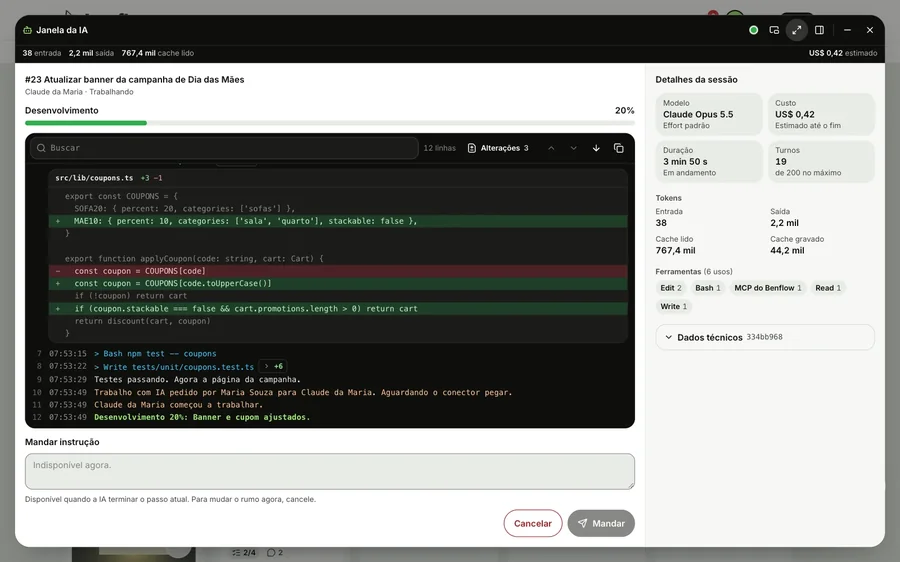
Each dev connects their own AI to benflow: Claude Code or OpenAI's Codex. It picks up the ticket with its context, writes and tests on the dev's machine, and the dev reviews before publishing.

Works where devs already work:

  • Mac
  • Windows
  • Terminal
  • VS Code
  • JetBrains
  • Claude app
  • Codex
Expanded AI window, with the live log, a file change open and the Claude session details
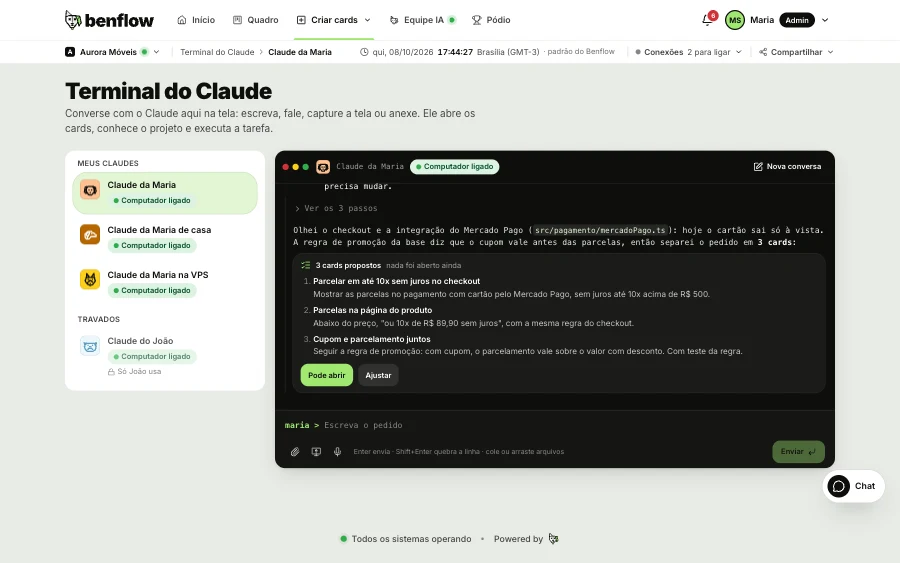
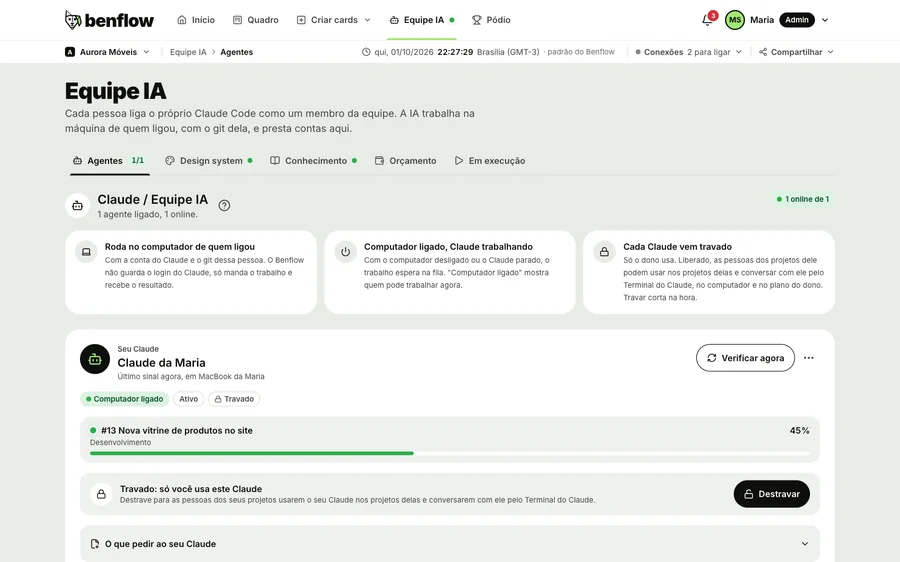
benflow AI Team, with Maria's Claude on, the computer connected and the card it is working on, with the stage and percentage
  • Claude Terminal

    Chat with Claude inside the panel: it reads the project, proposes the list of cards and only opens what you approve.

  • Several cards at once

    Each Claude or Codex handles up to three cards at once, and whoever enabled their Claude lends it to the team.

  • You're in command

    Send instructions mid-work or cancel on the spot. With Claude, allow commands or confirm them one by one.

Auto button, on the board

The queue on auto, or your way

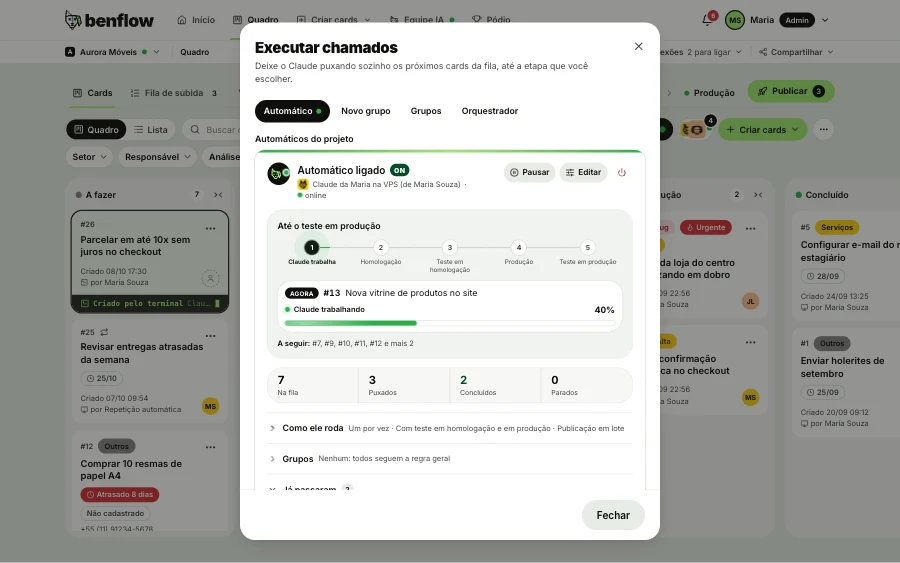
  1. Turn on auto mode. Choose the queue (new cards or all To do), the sector, the assignee and the AI that runs it: a Claude or a Codex.

  2. Bugs and priority first. Each AI handles up to three cards at once, each in its own copy of the repository.

  3. As far as you choose. Staging, QA test or production. A failing test, a broken deploy or an exhausted budget pauses it and notifies you.

  4. Or select by hand. In the Groups tab, select the tickets and how they go up: in the local queue, together, or directly, with each one's commit checked on GitHub.

Run tickets window on the Auto tab: Maria's Claude auto mode on the VPS, up to the production test, current card 13 at 40%, the next ones in the queue and the In queue, Pulled, Done and Stopped numbers
Marketing

The project's marketing, in the same panel

Turn it on in AI Team: Claude studies the project like an agency, creates the pieces, builds the calendar and publishes.

  • Project study

    Persona, audience, business, SWOT, the site and the system, with improvements that become cards.

  • Pieces with your brand

    Art, carousel, Unsplash photo or infographic, with the Design system, logo and brand references attached to the piece.

  • Ask the AI on the piece

    On the piece's card, ask the AI for a tweak: shorter title, a different photo, more contrast.

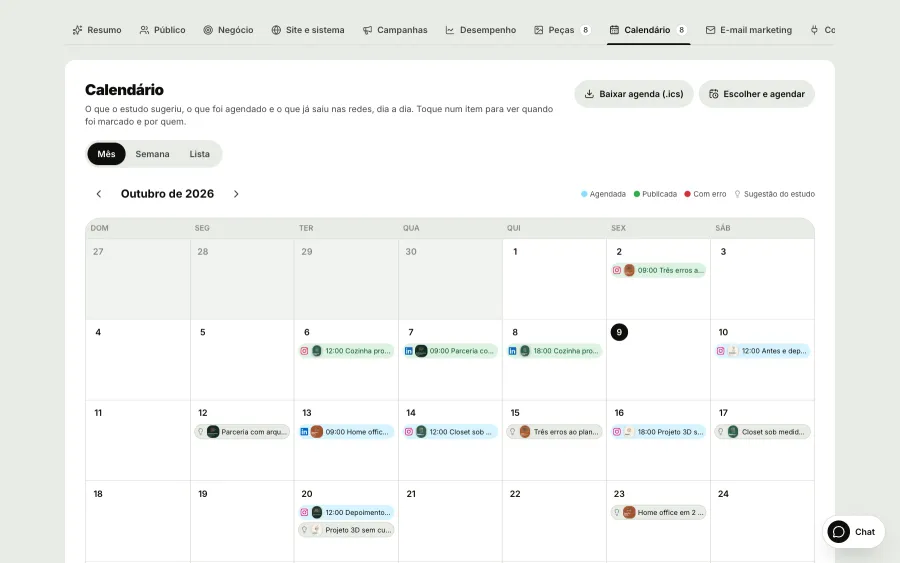
  • Calendar

    Month, Week and List, with Select and schedule to mark several pieces at once.

  • Automatic publishing

    At the scheduled time, benflow publishes on Instagram and LinkedIn.

  • Campaigns and numbers

    Campaigns with progress, Email marketing and the numbers from Google Analytics, Search Console and Hotjar.

Aurora Móveis AI Team Marketing on the Calendar sub-tab, next to Summary, Audience, Business, Site and system, Campaigns, Performance and Pieces: the month with pieces on their days, published on Instagram and LinkedIn in green, scheduled in blue and the research suggestions, with Download schedule and Choose and schedule

How to turn on project marketingPublish and schedule on Instagram and LinkedIn

Qualidade

Tested and approved before going live

The proof of each delivery, with tests, screenshots and video, stays on the ticket. The validator approves through the panel or Telegram, and only then does it go to production. If something fails, the ticket comes back with the reason.

GitHubGitHub Actions

Local

The proof stays on the ticket

Before calling it done, the AI records the tests, screenshots of the screens that changed, a short video to each change, the log and the link.

Test

12 of 12

passed · 0 failures

Screenshot

Log

$ npm test

12 passed in 1.8s

$ npm run build

build ready in 4.1s

Link

  • Commit a1b2c3d
  • chamado/clinica-42
  • localhost:5173/agenda
Deploy to staging

Tests again and publishes the test version: git push origin develop.

Homologação

The panel shows the deployment

Each GitHub Actions step shows up on the ticket, with timing and log, without having to open GitHub.

GitHub Actions

Success

Deploy staging

develop · a1b2c3d · [clinica-42] fixes scheduling on iPhone

  1. Checkout, completed in 3s
  2. Install dependencies, completed in 38s
  3. Tests, completed in 1m 12s
  4. Build, completed in 41s
  5. Deploy staging, completed in 19s
Staging liveTotal 2m 53s

Pedro HenriquePublished by Pedro, from his machine. The panel shows every step.

Validação

Checked and approved

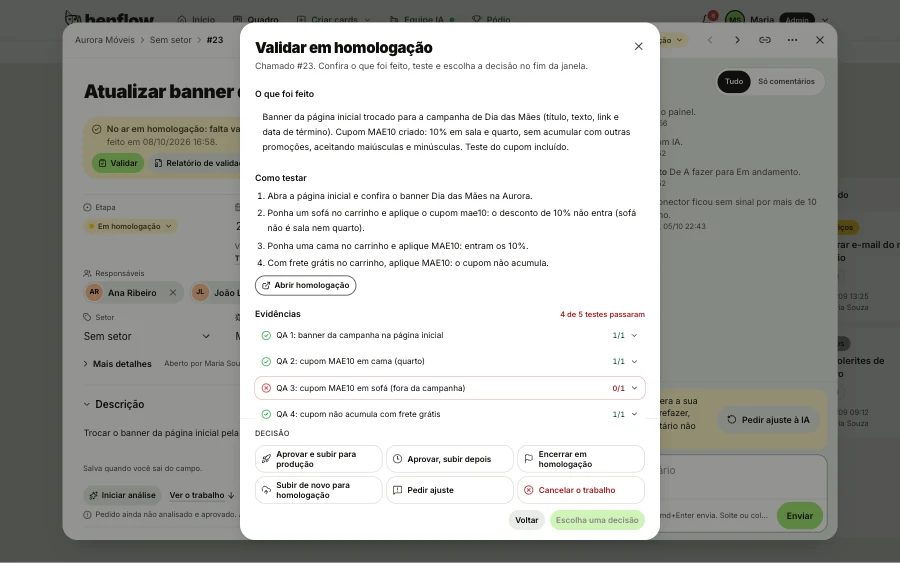
The Validate window holds what was done, how to test, the tests, the screenshots and the video of Claude navigating to the change. Approve, request changes or cancel, from the panel or Telegram.

Validate in staging window, with what was done, how to test, Claude's tests and the decisions at the bottom

benflow · Nuvem Studio

Ticket #42: Scheduling won't open on iPhone

It's already in staging and needs your validation.

Open staging

Produção

Live only after approval

Only this ticket's change goes to production, tested again. Whatever is still in testing stays out.

origin/mainhotfix/clinica-42push to main
developmainNever merge develop into main.
Validation approvedDeploy to production

Permissions per person

Pedro Henrique

Pedro Henrique

Dev full stack

Can deploy to develop (staging)
Can deploy to main (production)
Diego Martins

Diego Martins

Tech lead

Can deploy to develop (staging)
Can deploy to main (production)
Project memory

Project memory doesn't walk out the door with anyone

The rules, the notes and what was agreed in meetings are kept, and the AI checks it all before touching the code or reading a new document. Newcomers understand the project fast.

Nuvem Studio memory graph: four projects (App Delivery, Portal Clínica Vida, E-commerce Farma+ and ERP Interno), the people on each and the Obsidian notes linked to them. Rafael's Claude checks the memory before touching the code. Use the project buttons to see details.

Nuvem Studio memory

Rafael's Claude
Personal notes
Rafael Nunes
Beatriz Alves
Júlia Castro
Fernanda Rocha
Marina Lopes
Pedro Henrique
Camila Duarte
Diego Martins
Thiago Reis
Larissa Moura
Ana Ribeiro
Lucas Prado
Gabriel Souza
Roberto Lima

Portal Clínica Vida

Client: Clínica Vida

Diego MartinsPedro HenriqueCamila DuarteMarina Lopes
Cliente: preferências.mdAgenda da clínica.md

Create cards, Files and materials

A document becomes cards, already in the project's style

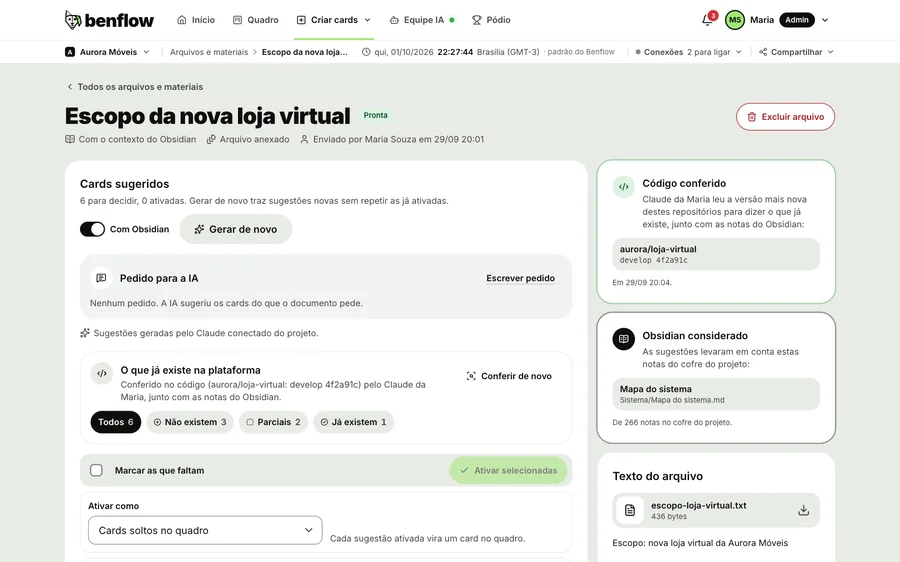
Attach the scope as a PDF, Word or PowerPoint file, or paste a link. The AI reads it along with the Obsidian notes, checks in the code what already exists and suggests the cards. They come in loose or as subcards of a main card, with a single prompt for Claude.

The AI reads with Obsidian and checks the code

Document read by the AI, with suggested cards, the code checked and the Obsidian notes taken into account

Subcards instead of ten loose cards

#61New feature

Clínica Vida online scheduling

From the file: escopo-agenda-online

Created 29/09 10:12

by Ana Ribeiro

Pedro HenriqueJúlia Castro
1

Subcards (2 of 5)

  • #62 Create the free time slots screen
  • #63 Block time slots on holidays
  • #64 Telegram reminder one day beforeIn progress
  • #65 Confirm the appointment with one tap
  • #66 Monthly absence report

Prompt for Claude (with 3 subcards)

Many clients

All clients on one screen.
Delays first

Each client has their own project. You switch projects without leaving benflow.

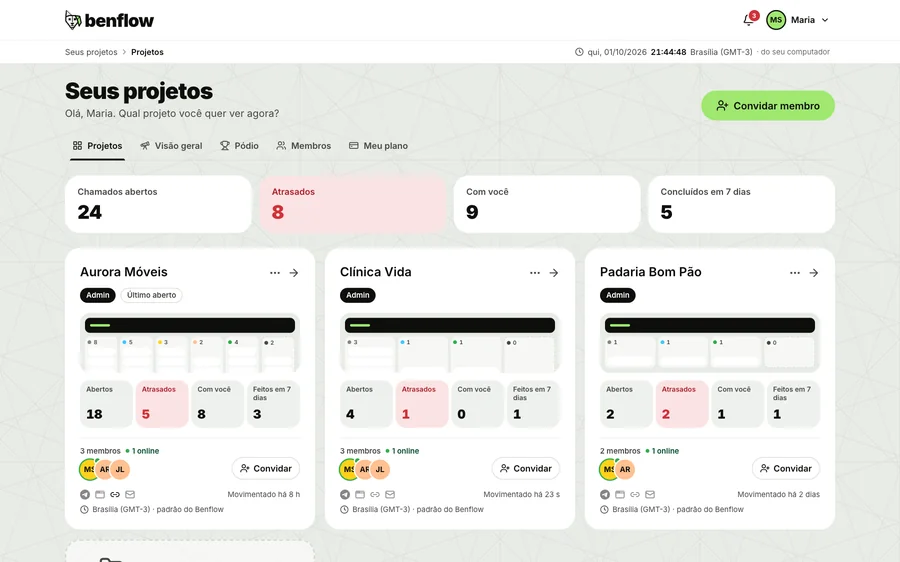
benflow Your projects screen, with a card for each client and each one's overdue items

One person, many projects

Diego Martins

Diego Martins

Tech lead, Nuvem Studio

3 projects
  • Portal Clínica VidaAdmin
  • Internal ERPAdmin
  • App DeliveryFuncionário
Global admin:
is Admin on all projects and takes care of organizations, users, links and Telegram bots.
Admin:
manages members, departments and the project's Telegram.
Employee:
views and works on the board.
  • One project per client

    Each client's requests, due dates and conversations stay separate.

  • Same person, many projects

    Each person has a profile in every project they work on.

  • Delays right at the entrance

    Open and overdue items for each client, so you know what to prioritize.

  • Overview and Podium

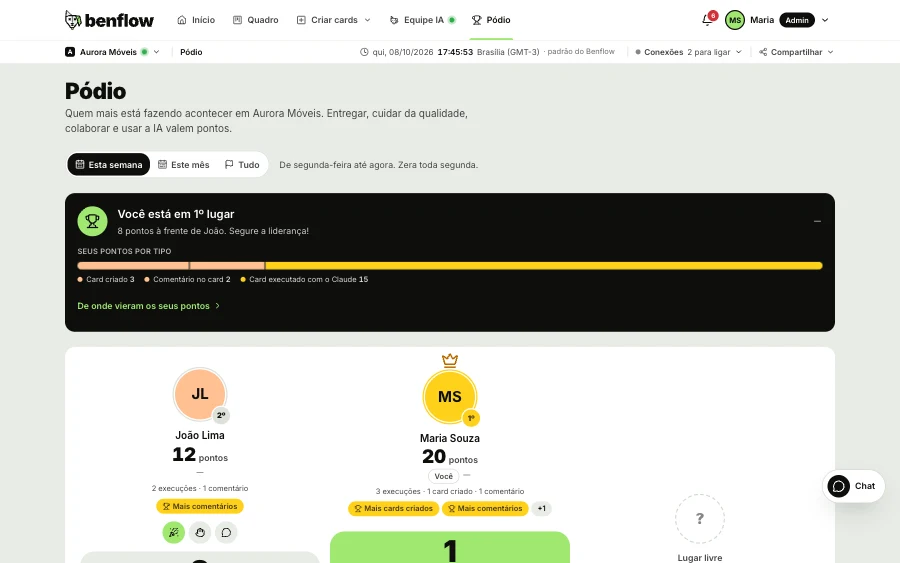
    The numbers of all projects and who made the most happen, in a single tab.

Client brandIn your clients' projects, the brand is theirs. benflow appears only in the footer, like this:

Powered by benflow
Segurança

Your code stays with your team

benflow connects to the client's channel, the AI and GitHub without taking control away from whoever builds the software.

  • The AI works on the dev's machine

    In their project, with their Claude or ChatGPT account. Claude only uses the allowed commands, and Codex only writes in the job's folders.

  • Protected keys

    Service keys are encrypted in Environments, Claude doesn't read secret files and each dev's access key stays protected on their computer.

  • The dev publishes

    benflow doesn't write to your GitHub. It only reads, to show the Actions and environments in the panel.

Better than reading is using it

benflow app

iPhone and Android

Your projects, in your pocket

  • Cards by voice
  • Works offline
  • Instant notifications
Coming soon on theApp StoreComing soon onGoogle Play
Meet the app

Coming soon to the stores.

Bento, a fluffy white dog with a green collar, in profile