For agencies and software houses
All clients in one panel. No lost requests
The request arrives via Telegram, email or the portal and becomes a card in the right client's project, with an owner and due date. The client follows along on their own and your team is free to deliver.
Then R$50 per project per month, with unlimited people. You decide whether to continue.
- Unlimited people: you pay per project
- A portal for each client, with their branding
- Claude or Codex on the team, reading each project's code
Card #19 created in Bom Pão
CClínica Vida
4 open
#40New feature
Appointment payment via Pix
 Telegram
BBom Pão
3 open
#16Bug
Duplicate order in the cart
 E-mail
FFarma+
5 open
#75Improvement
Store filter on the map
 Portal
Serving several clients doesn't have to be chaos
What you hear every week:
- 01
Requests everywhere
Group, email, phone call and direct message. The newest request gets lost and the team finds out when the client complains.
- 02
Client chasing all day
Without seeing progress, the client asks. Every "so?" pulls someone away from the code to reply.
- 03
Every project done differently
One client on the board, another in a spreadsheet, another in the dev's head. Nobody sees the whole picture.
- 04
Report built by hand
At the end of the month someone pulls together what was done to justify the invoice. Hours nobody bills.
All of this has a solution. See below.
From the client's message to delivery going live
One panel for the whole agency, one project for each client and one single way of working.
Requests everywhereClient channel
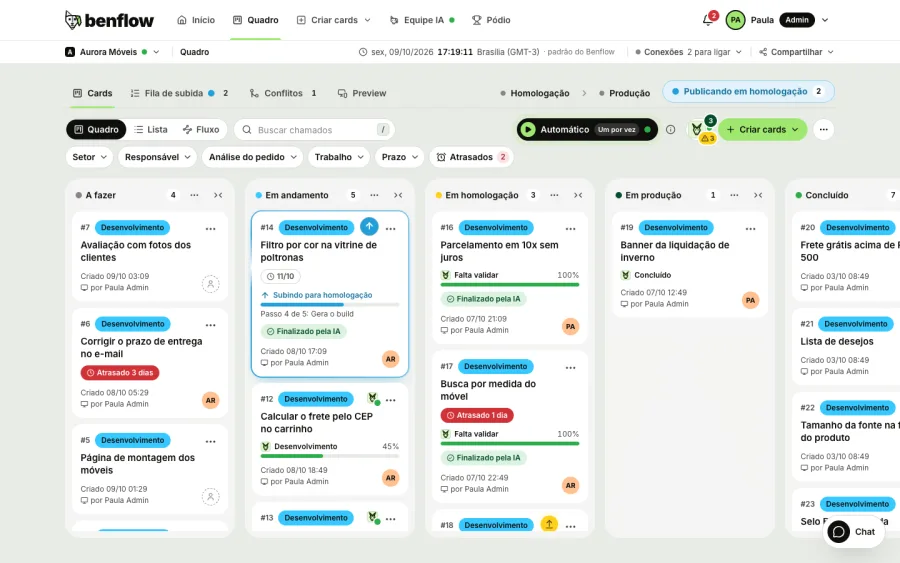
Every message becomes a card in the right project
The client talks through whichever channel they prefer: Telegram group, project email or portal. benflow opens the card with the original text, screenshot and audio, and confirms right away with the ticket number.
- Type, sector and due date come from the message itself
- An email address for each project
- Screenshot, audio and file go along to the card
Client chasing all dayClient portal
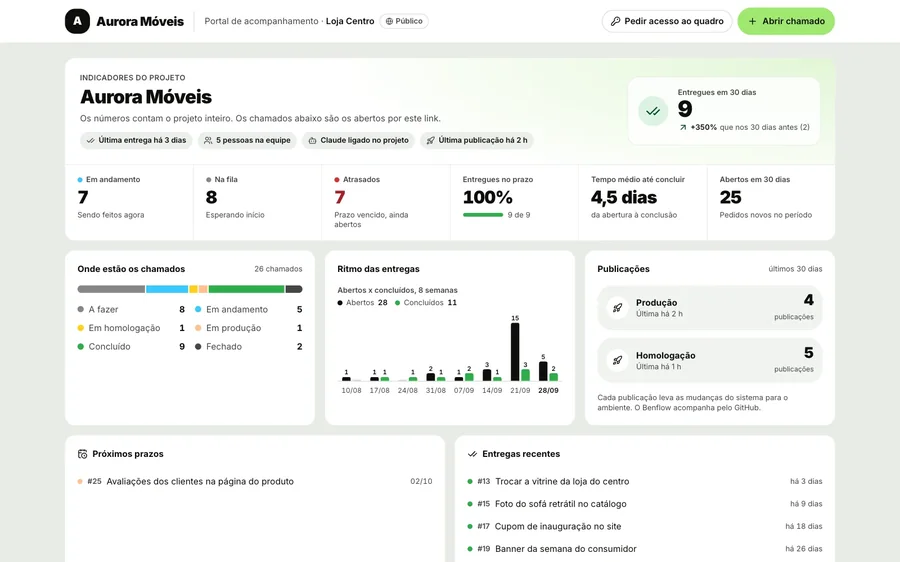
The client follows along without having to ask
Each client gets a link with their branding and the project's numbers: deliveries in 30 days, what's in progress, the weekly pace, releases and upcoming due dates. It updates on its own.
- The team's internal notes never appear to the client
- The client requests board access through the portal itself
- The delivery notice goes out on the same channel as the request
Every project done differentlyMultiple projects
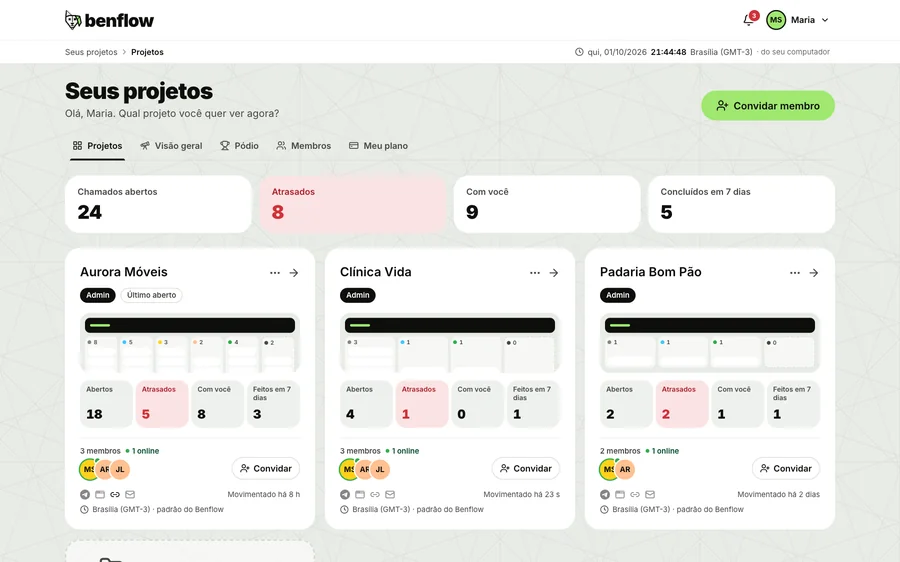
All clients on the same screen
The agency sees each client with what's open and what's late. The team switches projects without switching tools, and the same Claude and the same GitHub serve everyone.
- Unlimited people: you pay per project
- Each client's overdue items in view
- Board, Home and ticket details identical across all projects
Report built by handWhat was done today
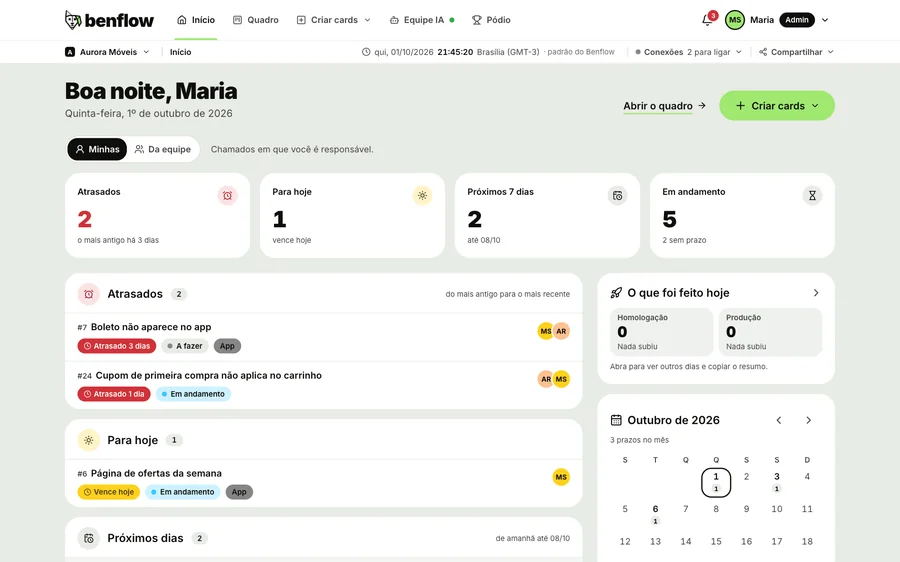
The report comes out ready
Home shows what went up to staging and production, with the time and who did it. At the end of the day the summary arrives by email. Just copy it and send it to the client.
- Today, yesterday, 7 days or a period
- Every delivery with the commit checked by the ticket tag
- Copy button to send to whoever needs it
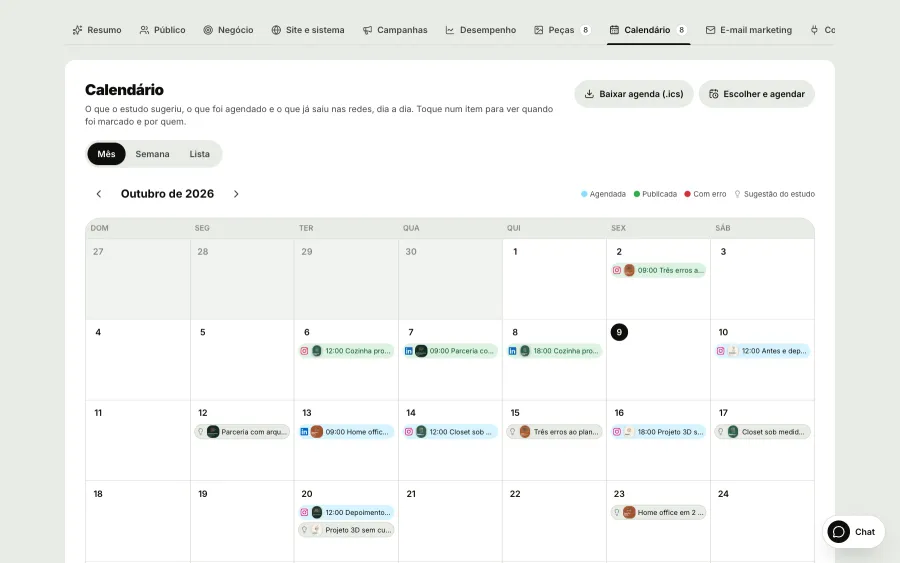
Client marketing done separatelyMarketing with AI
Each client's marketing, in their own project
Turn on marketing in the client's project: Claude studies the product like an agency would (persona, audience, business and SWOT), creates pieces with their brand and builds the month's schedule. At the set time, benflow publishes to Instagram and LinkedIn.
- Pieces, carousels and infographics with each client's brand
- Posts scheduled on each one's Instagram and LinkedIn
- A project for the agency to promote its own work
Your team's AI speeds up the work
Each dev connects their own Claude Code or OpenAI's Codex to benflow. The AI reads the client project's code, shows the impact of the change and runs tickets in batches, on the dev's machine.
- Impact before touching anythingAreas, profiles, notices and rules the change touches, in plain language.
- Several cards at onceEach Claude or Codex handles up to three cards at once, each in its own copy of the repository.
- The team has the final sayWhoever validates sees the video of what changed and decides. benflow checks the commit and notifies the client.
$ benflow executar --destino homologacao
benflow: 2 tickets in the batch, Clínica Vida
#44 Novo filtro por convênio
#45 Remarcar consulta pelo e-mail
● Reading the code: src/agenda, api/horarios
● #44 Development
✓ 18 tests passed
✓ commit 3f9a1c2 [#44] filtro por convênio
✓ Deploy to staging complete
benflow: client notified on Telegram
#44ImprovementAI working
New filter by health plan
Staging92%
New in benflow, for the agency
The delivery in view all the way to live, the client's site at every size and the AI pulling the queue on its own.
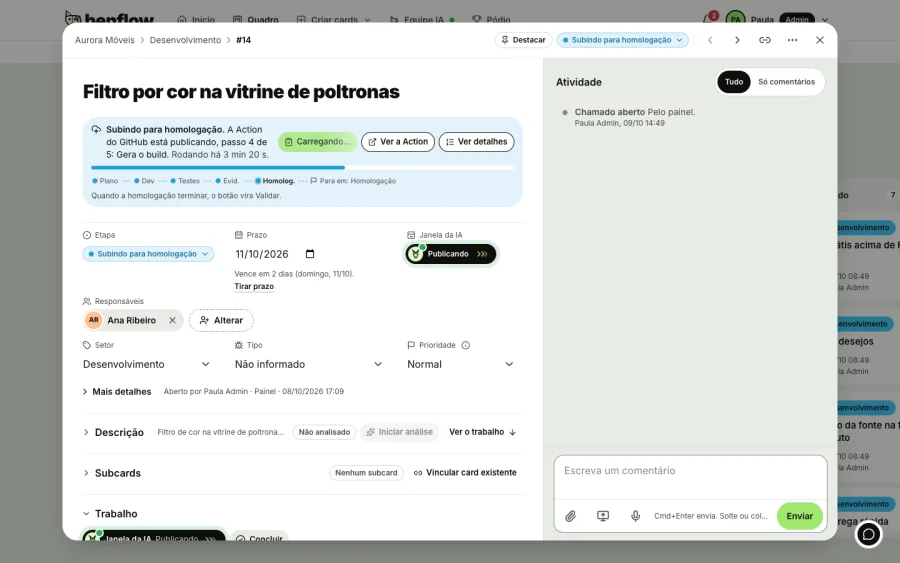
The release in view, all the way to production
The card being released moves to the top of the column, with the Action step, and Publish becomes Publishing. You see what's going live for each client without asking the dev.
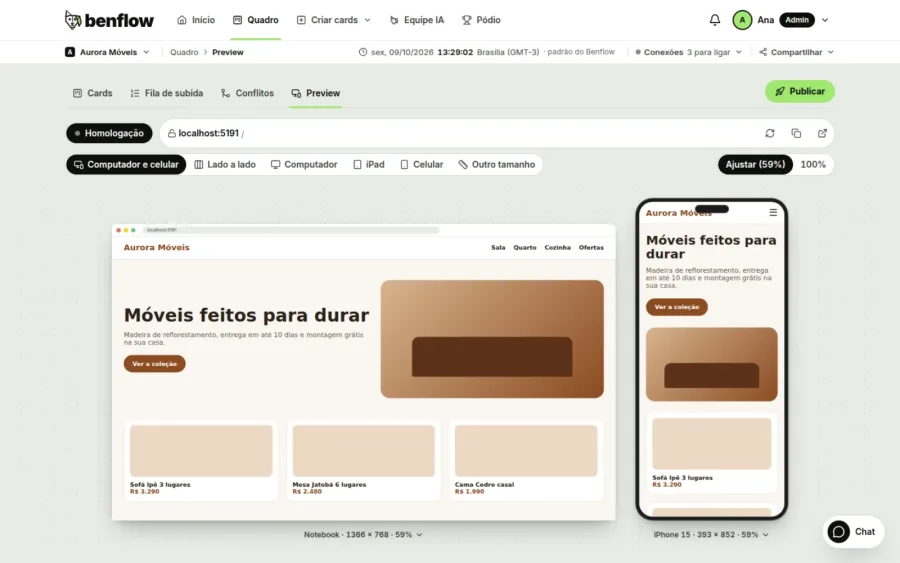
Preview on computer and phone
Open the client's site in staging or production, on computer and phone at the same time, without leaving the panel.
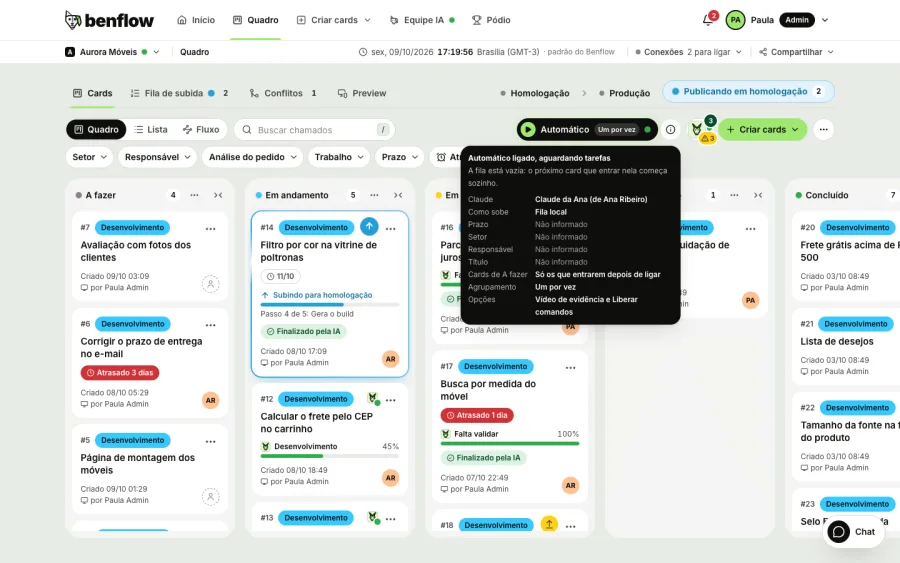
Auto
Turn on auto mode with any queue you like, by sector, assignee or title, and Claude or Codex pulls the To do cards on its own, on the days and times you choose.
Live
Live network
A live map with the cities of people who use benflow: every card that's born and every delivery that goes live lights up instantly, with no client names.

More clients, the same team
When the request arrives organized and the client follows along on their own, the agency serves more people without becoming a message switchboard.
Everything the agency needs
- Unlimited peopleOne project for each client. The whole team joins at no extra cost.
- Portal with the client's brandingThe project's logo at the top and a discreet Made with benflow.
- Project Telegram and emailThe client makes requests through where they already talk to you.
- Tests, screenshots and videoEvery delivery with the tests and a short video of what changed.
- Team chatChannels and direct messages. A message becomes a card with its files.
- Daily summary by emailWhat was done in each project, ready to send.
Paid per client or per person?
Per project, and you decide how many to create: one for each client. The people on your team are unlimited and cost nothing extra.
Does the client need to create an account?
No. They make requests through the Telegram group, the project email or the portal, and follow along through the portal link.
Does the client see the team's internal conversations?
No. Internal notes never appear to whoever made the request. The portal shows only what is public.
Do I have to use Claude?
Not required. The board, portal and channels work without AI. For the AI to work, each dev connects Claude Code or OpenAI's Codex: it reads the code and speeds up the dev's work.
Is the clients' marketing in the same panel?
Yes. Each project has its own marketing in the AI Team, with the research, pieces, schedule and that client's Instagram and LinkedIn. To promote the agency, create a project for it.
benflow is also for
Bring your first client hoje
Then R$50 per project per month, with unlimited people. You decide whether to continue.
- Panel ready instantly
- Price per project
- Unlimited people
- Cancel anytime