Software request management with AI
The request comes in. The delivery goes out
The client's message becomes a card, the AI gets the code moving and the client follows along without chasing.
Example, with fictional clients: client messages arrive by Telegram message and audio, email, meeting minutes and files, go through benflow and become cards that fit into the board columns.
Live: benflow in numbers
See the live network- Tokens processed by Claude
- Cards opened
- Cards resolved
- Projects
- People
- Online now
From code to marketingWorks with what your team already uses, from code to marketing.
Development
Marketing
Every “so, is it done?” pulls the dev out of the code
Scattered requests, clients chasing and lost context. The dev stops, searches, replies and loses their rhythm. In benflow, each card shows where it stands, from request to production.
- Fewer interruptions
- Informed client
- Context preserved
Example, with fictional clients. Without benflow: requests scattered across messages, emails, spreadsheets, sticky notes, missed calls and meetings with no tasks. With benflow: the same requests become organized tickets on the board, with a due date, an assignee and the AI's work tracked.

Drag the bar to compare
Example, with fictional clients. Without benflow: requests scattered across messages, emails, spreadsheets, sticky notes, missed calls and meetings with no tasks. With benflow: the same requests become organized tickets on the board, with a due date, an assignee and the AI's work tracked.

Already using Replit, ClickUp or Trello?
See, point by point, what changes with benflow: the client's request, the code with your Claude or your Codex, production and the monthly bill.
See the comparisonThe why, what and how of benflow
01 · Why
Why
Because scattered requests and clients chasing pull the dev away from the code. With everything in a single flow, the team delivers more and nobody has to ask where things stand.
02 · What
What
Ticket board, client portal, team chat, each dev's AI on Auto and the release all the way to production, in one place.
03 · Who
Who
Devs, digital product owners, people who hire devs or agencies, and development teams.
04 · Where
Where
In the browser and in the mobile app, even offline. The client talks via Telegram, email or portal.
05 · When
When
From the first request to production: the card shows each stage and the release, and the client is notified.
06 · How
How
Create the project, connect the client's channel and connect each dev's AI, Claude or Codex, from a computer or a VPS.
See the step by step07 · How much
How much
R$50 per project per month. Unlimited people.
See the plans
From the client's request to the approved delivery
The client asks, the AI organizes, the dev delivers and the validator approves. Everything is recorded on the ticket.

Ticket #42 opened
Booking won't open on iPhone
Open in panelEvery request, in 5 steps
From the first message to going live.
- Step 1
The client asks
Via Telegram, email, portal or app, with text, photo or audio. Monitoring errors become cards too.
TelegramEmailPortalAppSentryDatadog - Step 2
The AI organizes the ticket
The AI checks the request against the project's knowledge base and adjusts the title and description.
ClaudeCodexObsidianDrive - Step 3
The team sees it on the board
The card shows up instantly in the panel and in the mobile app, with the complete record and the path to production.
PanelMobile appAuto - Step 4
The dev delivers with AI
Claude Code or Codex builds and tests in the local environment, one card at a time or the whole queue on Auto.
Claude CodeCodexgitPreview - Step 5
Tested, approved and live
Ready ones go up together in one Action, with the QA test and the release visible on the card. Production only with permission.
ActionsGitHubVercelHostingerAWS
What only benflow shows
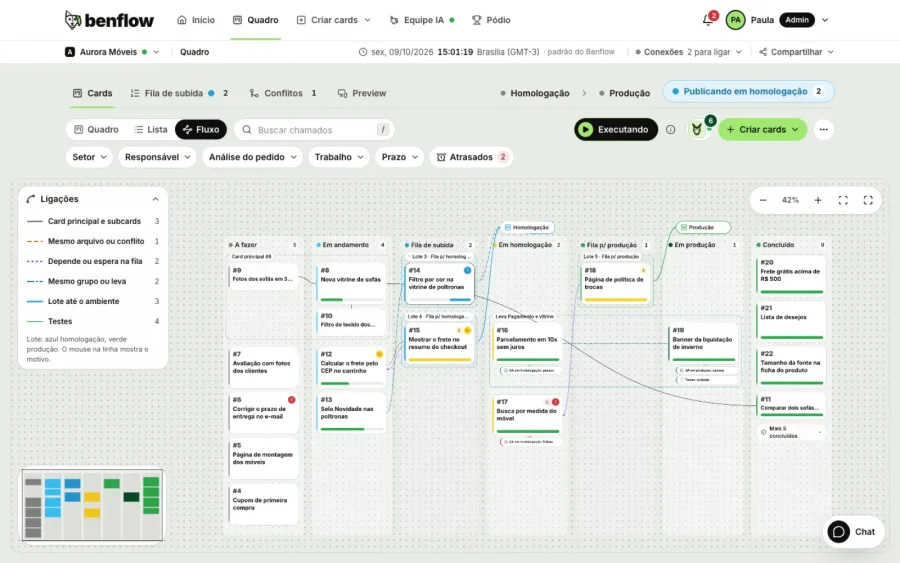
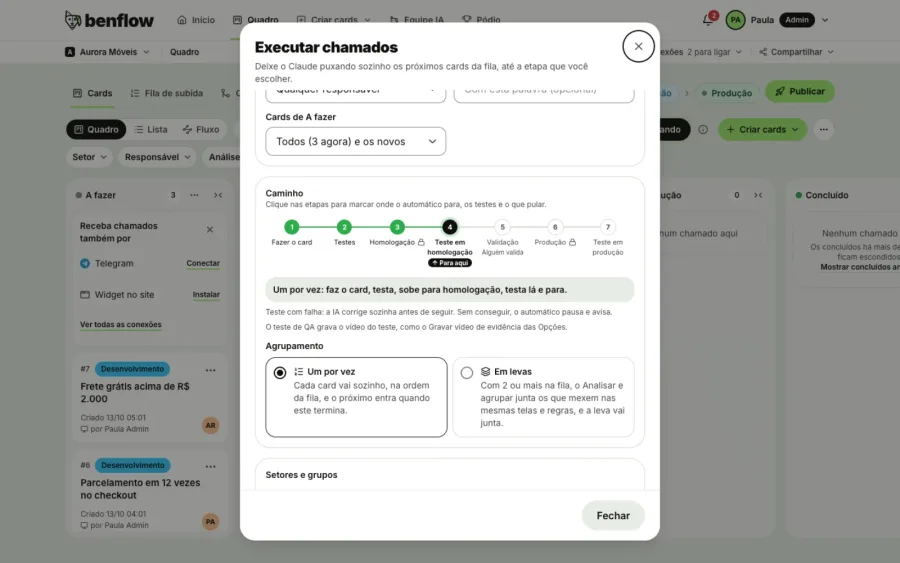
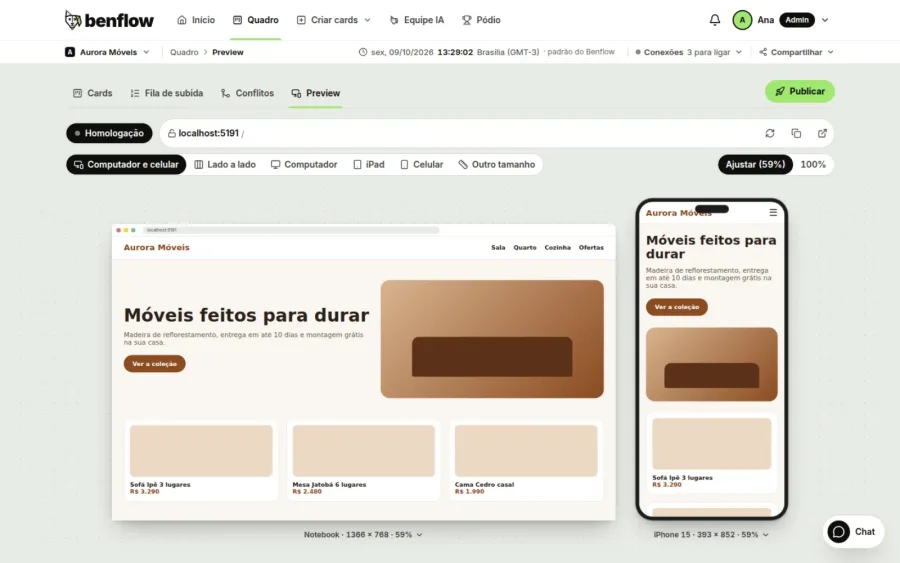
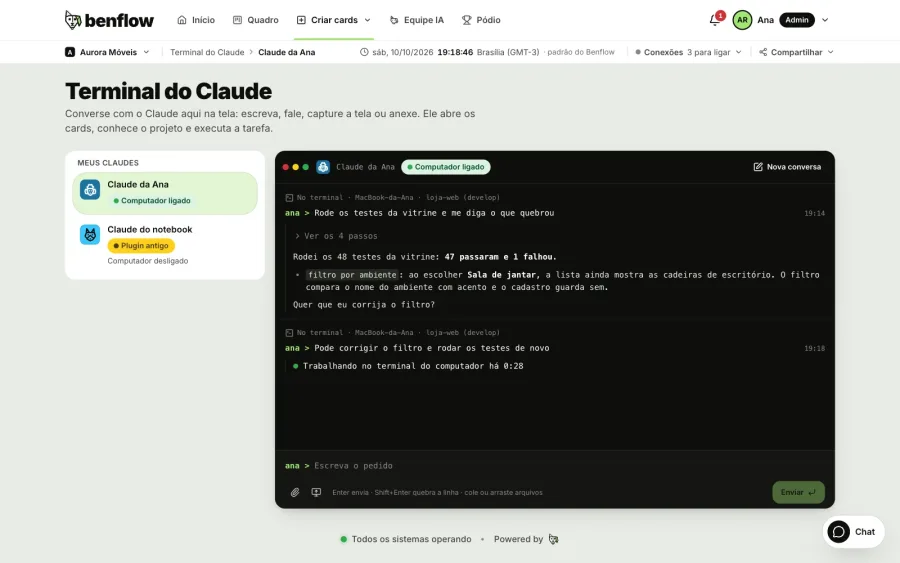
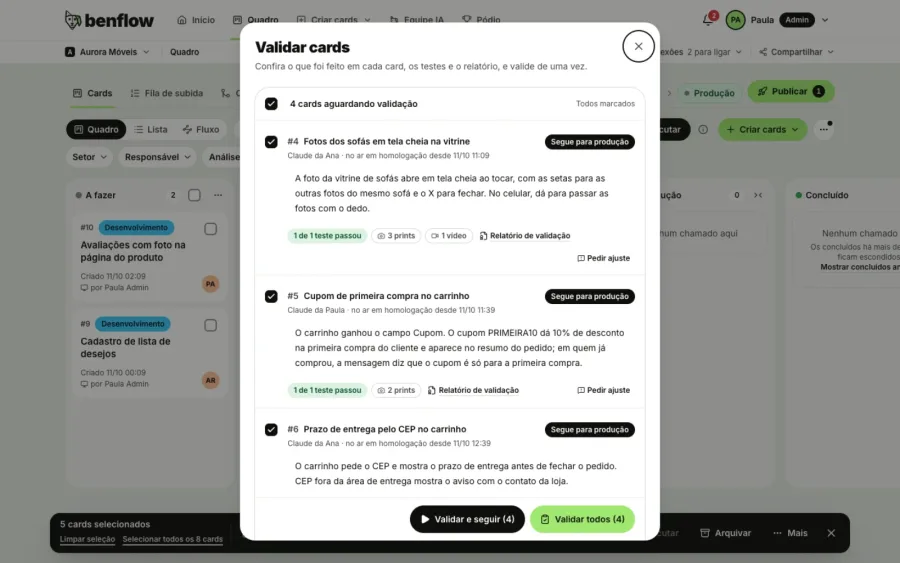
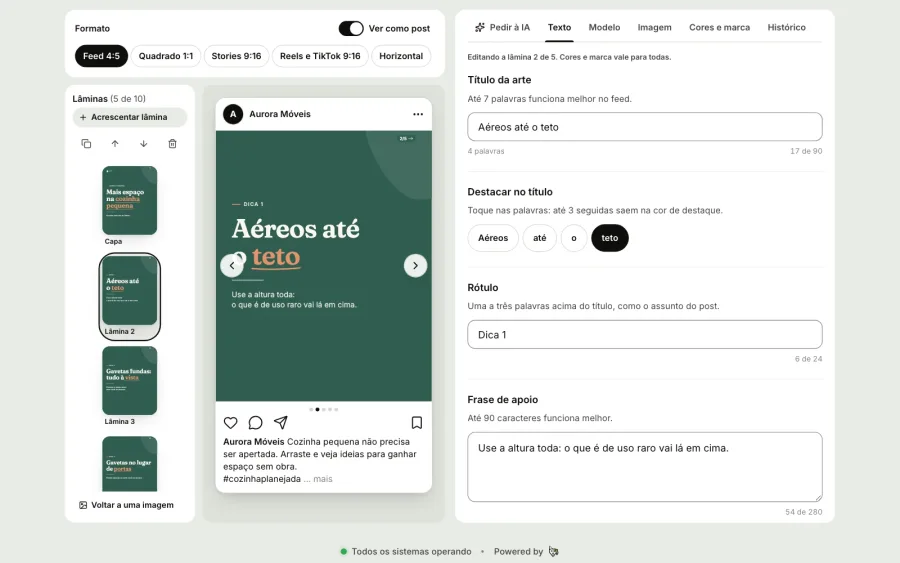
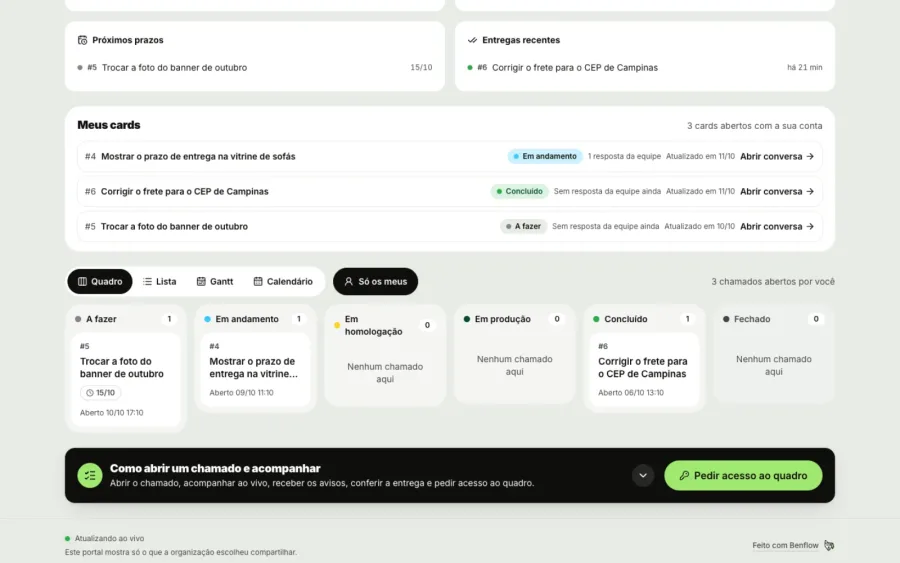
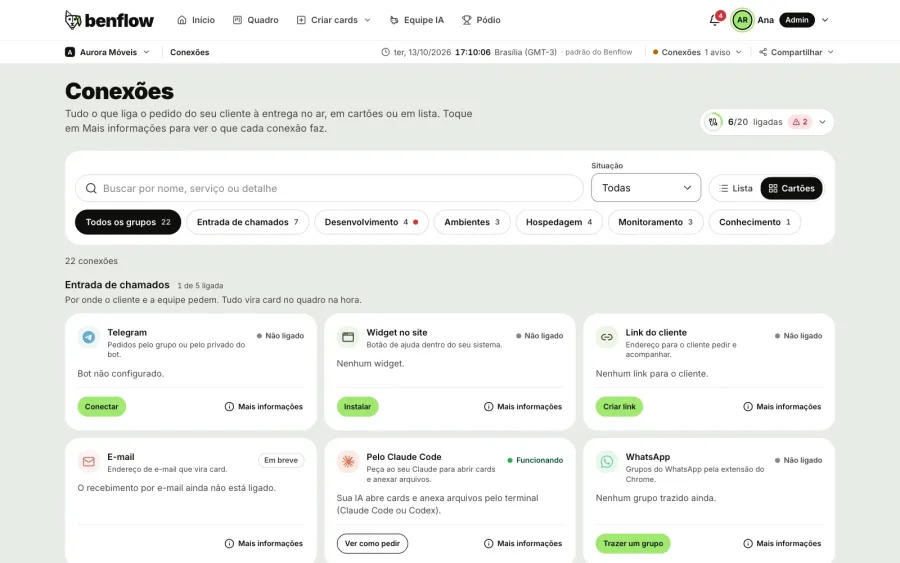
01 / 12
Board
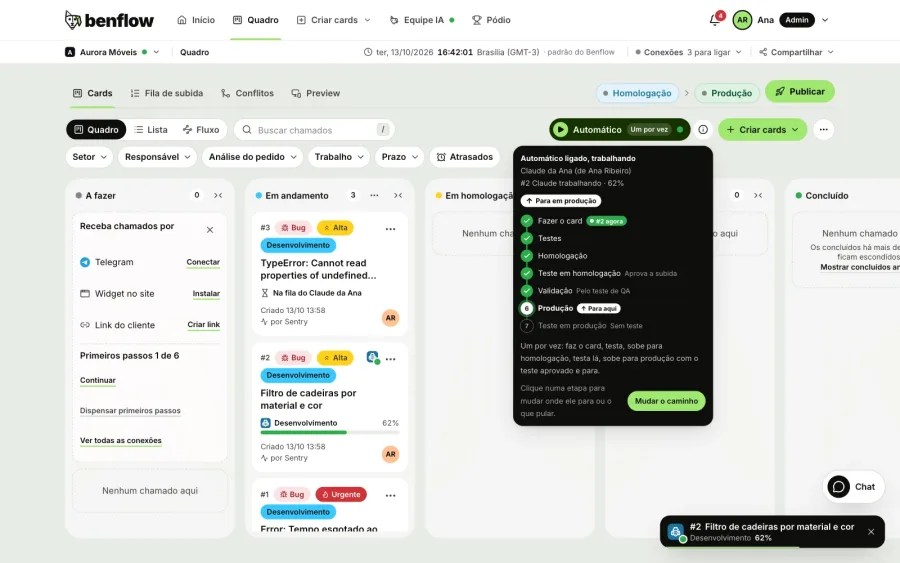
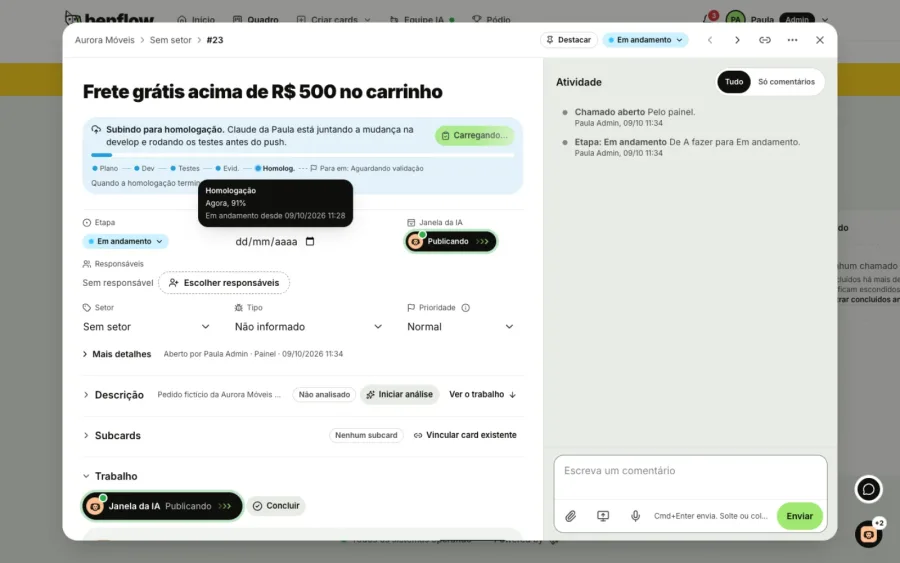
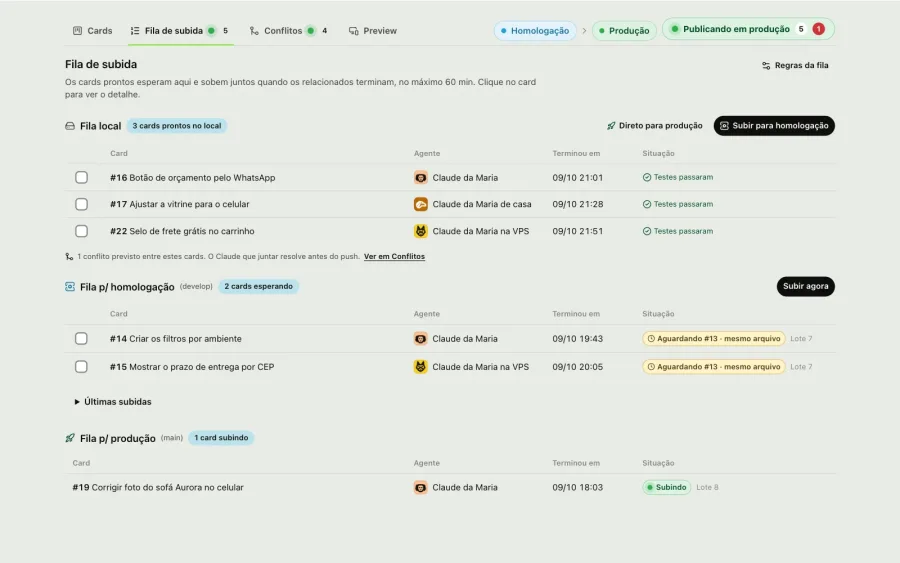
Every request becomes a card. The Auto button shows the path, from card done to production, and the current card.
Launch · until 31/12/2026
Start free
Create the panel, bring in your first client and watch the request turn into a delivery. Take the chance to feel the difference in your productivity.
- No card
- Panel ready instantly
- Cancel anytime

1st project
LaunchR$0,00
per month until 31/12/2026|then R$50
- No credit card
- Unlimited people on the project
- From 01/01/2027 on, only if you want to keep going
Everything connected, from request to deploy
People, AI and tools on the same network, from code to marketing. The AI speeds things up, the team decides.
Marketing
- Telegram
- Client portal
- Meeting
- Memory
- Auto
 Ana
Ana Pedro
Pedro- Claude
- Codex
 Júlia
Júlia- GitHub
- Release queue
- Staging
- Production
- Preview
- Google Analytics
- Search Console
- Research
- Pieces
- Schedule
- Email marketing
- Telegram
- Client portal
- Meeting
- Memory
- Ana
- Auto
- Claude
- Pedro
- Júlia
- Codex
- GitHub
- Release queue
- Staging
- Production
- Preview
Each dev connects their own Claude or Codex
The AI works on the code, on the dev's machine and with their git. Claude also takes care of the project's Marketing.
Several cards at once
The dev selects them or leaves it on auto mode. Each AI handles up to three cards at once.
The team has the final say
Whoever validates sees the video and decides: production, adjustment or cancel. In Marketing, the piece only goes out when the team schedules it.
From study to live post
The AI Team studies the project, creates the pieces with your brand, builds the schedule and publishes on Instagram and LinkedIn.
Estudo
The project's persona, audience, business and SWOT.
Marketing study
Aurora Móveis
Rita, the owner of the new apartmentPersona: couples aged 30 to 45- Strengths
- Guaranteed deadline
- Weaknesses
- Little presence on LinkedIn
- Opportunities
- New buildings in the area
- Threats
- Ready-made furniture
Peça
Reference and art with your brand become the piece.

Brand reference Line illustration 
Agenda
The pieces on the days of the month, ready to go out.
Month schedule
ScheduledPublished
Each piece on the right day and at the right time for the network.
In the list
 Before and after: Rita's kitchenDay 10, 12:00Scheduled
 Home office in 2 m²Day 13, 09:00Scheduled
- Kitchen ready in 45 daysDay 15, 18:00Published
Live
At the scheduled time, benflow publishes on its own.
9:41auroramoveisPublished on Instagramauroramoveis From the 3D design to installation in 45 days, with the deadline in the contract.
Aurora MóveisPage
Your project delivered on time, with every stage tracked.
 Published on LinkedIn

- Carousel
- Unsplash photo
- Infographic
- Ask the AI on the piece
- Campaigns
- Email marketing
- Google Analytics, Search Console and Hotjar
- Improvements that become cards
How Marketing worksSee Marketing inside
Pieces from the example project Aurora Móveis, created in benflow Marketing.
Every request goes through the system network
The project's screens, business rules, profiles and notifications are linked in a network. Before touching the code, Claude or Codex checks this network and the card comes out already saying where to change, which rule to follow, who feels the change and who to notify.
New request#13
New storefront with room filter and quote button
Solution ready
Solution for #13Ready
- Where to changeStorefront, room filter and delivery time by ZIP code
- Rule to followA quote only goes out with a valid ZIP code
- Who feels itStore customer and salesperson
- Who to notifyNew quote email to the salesperson
It stays on the card, in the Where to change and Impact tabs, before anyone writes a line.
Example: the request New storefront with room filter and quote button comes in, Claude checks the project network and the solution comes out with where to change (storefront, room filter and delivery time by ZIP code), the rule to follow (a quote only goes out with a valid ZIP code), who feels the change (store customer and salesperson) and who to notify (new quote email to the salesperson).
Works with the Claude or Codex of a dev connected to the project, with the project notes and repository access. Even when connected to several projects, the Claude on each job only sees the folders, tickets and knowledge base of that project.
Start free. Pay per project
R$0
on your 1st project, until 31/12/2026
- No credit card
- Unlimited people
- Cancel anytime
Starting 01/01/2027
R$50per project
Unlimited people. Your clients don't pay.
TotalR$100.00/month
Every project comes with everything
- Telegram and email
- Claude or Codex
- Client portal
- Mobile app
- Tested deploys
- Marketing
Questions before
you start
The answers to what weighs most in the decision.

Still have questions?
Open a ticket here on the site. The people who build benflow answer.
- You create your account, connect your Claude and pick the projects on your computer. The 1st is free until 31/12/2026, and the others cost R$50 per month each, from day 1. Use it to feel the difference in your productivity.
- The free project starts costs R$50 per month, like the others. Those who already subscribe see the new amount in their monthly fee, which was shown and accepted at sign-up. Those who don't subscribe get a notice and choose whether to subscribe to continue. Nothing is charged without a subscription.
- Not for the free one. A card is only needed for projects beyond it, through Mercado Pago.
- In the launch offer, the 1st project is free until 31/12/2026, no card. The other projects cost R$50 per month each, from day 1, and from 01/01/2027 on the free one also costs R$50 per month, if you want to continue. Unlimited people, monthly recurring billing through Mercado Pago. You can cancel anytime with no penalty: access continues until the end of the period already paid.
- It works. You can try it solo and subscribe from 1 projeto, and invite anyone you want at no extra cost. Each client gets their own panel, so solo workers also keep each client's requests separate and reply to everyone without leaving benflow.
- No. People are unlimited: devs, managers, QA and support join the project at no extra cost. Billing is only by the number of projects. The client doesn't pay and doesn't need an account either: they ask and reply through the Telegram group or the client portal, and everything shows up in the project. Were you invited to someone else's project? To create your own projects, subscribe to your own plan.
- There are other ways. By email: each project has an address, the email becomes a card with its attachments, and the client's reply comes in as a comment. They can also follow and open requests through the client portal, with just a link.
- Yes, for iPhone and Android, and it's coming to the stores soon. In the app you follow all your projects, see the card live, create cards by text or audio, turn on Auto, validate and publish. It even works offline: the recorded idea stays saved on your phone and becomes a card when the signal returns. The account and the rules are the same as in the panel.
- Yes. In each project's Files tab, attach the PDF, Word or PowerPoint file (or paste a page link). The AI reads it along with the project's Obsidian notes, if you leave that on, and suggests the cards. You choose what goes in: loose cards on the board or subcards of a main card, which carries a single prompt with all of them for Claude. The dev can also ask their Claude Code or Codex to open the cards from a document.
- Only for the AI Team, where each dev's AI works on the tickets, and it can be Claude Code or OpenAI's Codex. The board, the Telegram bot, the team chat, the client portal, reading minutes and documents, and the mobile panel work without them. Project memory (Obsidian or a Drive folder) is optional too. To organize requests, benflow can use Claude or a free automatic reading, and if the AI fails the bot keeps replying. The AI belongs to each dev's account, with the Anthropic or OpenAI subscription paid separately. Each dev connects one AI or several, on their computer or on a VPS, and can use the Claude a teammate shares.
- Yes. In AI Team, on the AIs sub-tab, choose Codex and click Connect my Codex: it signs in with a ChatGPT account (Plus, Pro, Business, Enterprise or Edu) or with an API key. Codex does the same work as Claude: it picks up cards, works on the code, tests and publishes, shows up on the board and displays plan usage. You can have Claude and Codex side by side in the same project, each dev with the subscription they already have, and benflow doesn't charge per AI request.
- No. It works on the dev's machine, with their git and account, on its own branch for each ticket. Claude only sees the project for the job, even when connected to several, only uses the allowed commands (or the ones you confirm on the card) and doesn't read
.envor other secrets. Codex works in a sandbox that only allows writing in the job's folders. Whoever validates sees what was done, the tests and a short video of the AI navigating to what changed. The panel shows each stage live, and you can cancel at any time. - No. The dev starts the work: they tell the AI (Claude or Codex) to run the card, or turn on auto mode and choose how far it goes. The delivery goes to staging first, where the team checks what changed, the tests and the video, and approves or asks for adjustments. Production only receives the delivery with the permission to deploy to production, which the admin grants per person and per project. Skipping validation or deploying directly, without staging, also requires that permission and is recorded on the card, with the name of whoever decided.
- If you want it to. In auto mode, Claude or Codex pulls the project queue (bugs and priority first), up to three cards at a time, and goes as far as you choose: the local queue, staging or production. With Allow commands, Claude doesn't stop to ask for confirmation, and a card that depends on another waits for it and goes up together. A failing test or a broken deploy goes back to the AI to fix; if that doesn't work, auto mode pauses and notifies you in the bell, without deploying anything. Without auto mode, the dev selects the cards and sends them to run with the Run button.
- The code stays on your GitHub and on each dev's machine. benflow only checks the progress of deployments on GitHub Actions, with a read-only token, and writes nothing to your repositories. Tickets, conversations and attachments stay on benflow's server, service keys are encrypted in Environments and Telegram audio is transcribed right there, without going through another service. We don't sell data. To organize requests, the text may go to Claude, from Anthropic: if you'd rather it didn't, talk to us.
- Start free: create your account, connect your Claude and pick the projects on your computer. Your company's panel is created instantly. Then:
- The First steps assistant takes you from sign-up to your first ticket in seven steps: questions about the project, your Claude connected live, the connections, the ways to open tickets and the team.
- Create the project's bot on
@BotFather, paste the token in Settings and add the bot to the client's Telegram group. - The admin connects the GitHub repositories in Environments, with a read-only token, and also stores the service keys and the hosting of each environment there. Each dev connects their own Claude Code in AI Team, or OpenAI's Codex, in the same AIs sub-tab.
Only the 1st project is free. The others cost R$50 per month each, and you can invite as many people as you like.
- Yes. The panel works on mobile too, in light or dark theme: you can drag cards, open the ticket, chat with the team, approve a delivery and follow the AI. And through Telegram anyone can open a request from anywhere.
Still have questions?
Open a ticket here on the site. The people who build benflow answer.
Still have questions?
The people who build benflow answer.
Ready to get your team in the flow?
Fewer interruptions for the team, more clarity for the client. Your 1st project free until 31/12/2026, no card.
You control the AI: the dev starts the work, approves in staging and only publishes to production with permission.
- Panel ready instantly
- No credit card
- Starting at 1 projeto

Example: ticket #42, Scheduling won't open on iPhone, was completed and the delivery is live, and the client Camila replied on Telegram that she tested it and it worked.

Live network
Watch benflow working right now
A live map with the cities of people using benflow. Every card created, every delivery that goes live and every AI job lights up instantly.